
1984 Mac cover for iPad
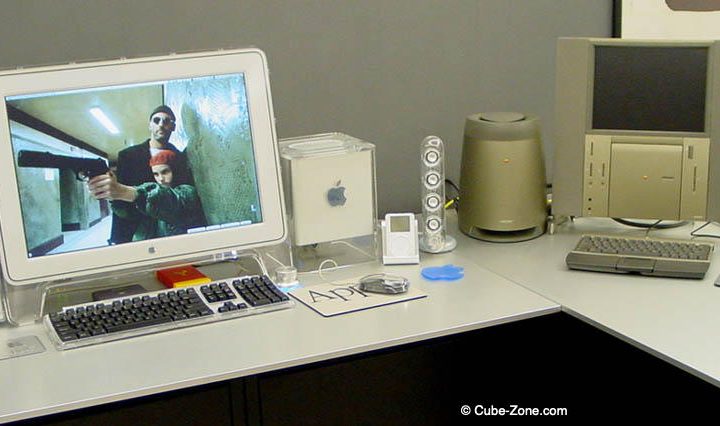
Saturday, November 10th, 2012If you want your iPad to look like the original iMac, ThinkGeek is selling the Padintosh. For $24.99, your iPad 2 or 3 will have a protection case that will remind you why 1984 was not like 1984! Check ThinkGeek for more information
Read moreMac OS X Lion Available Today From the Mac App Store
Wednesday, July 20th, 2011Apple today announced that Mac OS X Lion is available today as a download from the Mac App Store for $29.99. Some of the features in Lion include: new Multi-Touchgestures; system-wide support for full screen apps; Mission Control; the Mac App Store; Launchpad, a new home for all your apps; and a completely redesigned Mail app. Additional new features in Lion include: Resume, which brings...
Read more
Apple Introduces New Mac Mini Models
Wednesday, July 20th, 2011Apple today Apple today updated the Mac mini with next generation Intel Core processors, new discrete graphics, high-speed Thunderbolt I/O technology and Lion. The new Mac mini lineup is the following : - The 2.3 GHz dual-core Intel Core i5 Mac mini with 2GB of memory and a 500GB hard drive starts at a suggested retail price of $599 (US), with options to add memory up to 8GB and a 750GB...
Read more
Apple Introduces New MacBook Air Models
Wednesday, July 20th, 2011Apple today introduced several new MacBook air models.The new Macs are based on Intel's Sandy Bridge platform. Apple also replaced the minidisplay port with a Thunderbolt port for peripherals. The new MacBooks also have backlit keyboards. They are offered in the following configurations: 11.6-inch - 1.6 GHz, 64 GB SSD, 2 GB RAM: $999 - 1.6 GHz, 128 GB SSD, 4 GB RAM: $1199 13.3-inch - 1.7...
Read moreApple Releases iTunes 10.4 (64 bits, full screen, designed for Lion)
Wednesday, July 20th, 2011Apple today released iTunes 10.4 with support for Lion's Full-Screen Apps feature. The other major feature of iTunes 10.4 is that it is now a 64-bit Cocoa application. According to Apple, "you can now use iTunes with OS X Lion's new Full-Screen App capability, which allows you to use iTunes and other apps without distractions. Navigate between your full-screen apps with a simple gesture....
Read moreApple Releases iTunes 10.1 with iOS 4.2 and Airplay Support
Apple today released iTunes 10.1. The new version of iTunes brings support for iOS 4.2 and Airplay.
The new functionalities in iTunes 10.1 are the following :
- Use AirPlay to instantly and wirelessly stream videos from iTunes to the all-new Apple TV.
- Sync with your iPhone, iPad, or iPod touch with iOS 4.2.
- Provides a number of important stability and performance improvements.
iTunes 10.1 is available for Mac OS X 10.5 and higher and Windows (32-bit and 64 bit). Since it is 10.5 only some PowerPC Macs are not supported any more.
DVD Software Giveaway for Mac and PC – WinXDVD
Digiarty Software completely rebuilt their official website and now is open to the public. To celebrate this event, they are giving away WinX DVD Ripper for Mac (regularly $39.95) from Nov 11 to Nov 17, 2010. Both Mac and Windows users could get this all-round DVD backup software for free during this giveaway period. WinX DVD Ripper allows you to backup your DVD, rip and convert DVDs to AVI, MP4, MOV, FLV, iTunes, Apple iPhone, iPad, iPod, PSP, etc.

Highlights of WinX DVD Ripper for Mac:
* 1:1 Copy DVD to Hard Drive & USB Flash Driver within 5 min. This DVD ripper allows you to directly backup DVD movie to hard drive and USB as single MPEG-2 files with original video and 5.1 Channel AC3/DTS Dolby audio. The built in ultra-fast "DVD Stream Copy" method makes everything done within about 5 minutes!
* Constantly Update to Support any New Protected DVDs in the Market. It converts both homemade and commercial DVDs (that you own, if it is legal in your country) by removing all DVD encryption technologies, including DVD CSS, region code, RCE, Sony ArccOS, UOPs, Disney X-project DRM.
* Rip DVD to MP4, FLV, iTunes, iPhone, iPad. This DVD ripper empowers users to rip the full content of DVDs to all popular video formats, like, MP4, MOV, MPEG, FLV, AVI, iTunes, etc. what's more, it facilitates users to play DVD movie to iPhone, iPhone 4, iPhone 3GS, iPhone 3G, iPod, iPad, Apple TV, PSP, etc.
The Mac edition DVD ripper works on Mac OS X Tiger/Leopard/Snow Leopard. And the Windows edition DVD ripper is fully compatible with Windows XP, Vista and Windows 7 (32 & 64 bit).
WinX DVD Ripper Giveaway
DVD Ripper for Mac
DVD Ripper for Windows
LivingRoom for iPad 1.5 – Create Floor Plans and Interior Designs
Planet Next today announced LivingRoom for iPad 1.5, a major update to their Lifestyle app that allows the user to easily create accurate floor plans, and then overlay design elements. The app includes a library of over 50 structural and design items, over 100 textures, 250+ colors, and the capability to add custom fabrics and textures. All elements are adjustable in size using touch or keyboard entry, as are their positions and angles. Once a floor plan is constructed, the user is free to move around furniture, lamps, cabinets, appliances, etc. to find the ideal arrangement. Room designs may be posted to Facebook and Twitter, saved to the Photo Library, or emailed as a PDF file.
On launch, in portrait or landscape mode, the app automatically re-opens the user's most recently edited floor plan. Alternatively, the user may choose My Rooms and scroll to the desired plan, or may select New Room and begin with a blank canvas. Starting with an empty screen, LivingRoom prompts the user to select the Add button, which brings up a translucent, horizontal band containing small icons of common household items, appliances, structural items such as walls and staircases, and basic geometric shapes.
Most users will start with a floor plan, easily created by dragging walls down from the library. The app accommodates either feet or meters, and wall dimensions can be quickly set by dragging control points. Selecting the wall object brings up its Information dialog, where the user may enter numerical dimensions into text boxes. Similarly, walls and all other objects can be moved by dragging, or incrementally using the Nudge tool. Also adjustable, both manually and by slider setting in the Information dialog, is the angle of each item. Each object occupies its own layer, and may be moved forward or backward. Even the most irregular layouts can be quickly constructed using the stretch, shrink, move, rotate, copy, paste, and lock functions.
Feature Highlights:
* Create professional quality room layouts and designs in minutes
* Saves all work automatically
* Generous undo/redo
* Large built-in database of structural and design items - furniture, appliances, lighting, bathroom & kitchen objects, and more
* Easily move, resize, and rotate objects; add custom labels
* Create irregular room types easily - just combine and rotate wall sections, doors, and windows
* Add colors and textures to any object in the room
* Keep all projects together and browse them easily in the built-in Rooms Gallery
* Duplicate any room with one touch
* Save designs to the Photo Library
* Share designs via Facebook, Twitter, and email
* Add custom fabrics and textures
* Keep notes for each project
* Set units of measure
* Optionally hide all furniture and only show structural components

With the floor plan complete, the user may begin the interior design process by adding items already provided in the library, or by creating elements and adding labels using the integrated keyboard. Scaling furniture is quick and intuitive, and within minutes the designer has a workable starting point. Particularly effective in adding realism is the Texture function, accessed from the Information dialog. From here the user can choose from a large library of over 100 grayscale textures, including: carpet, concrete, fabrics, leather, metal, stone, tiles, wood, and other. Once assigned to the object, any of 256 different colors may be applied to the particular texture. There are also provisions for adding custom textures, and employing custom photos as surfaces.
As part of its simple, interactive interface, the developers have also included a variety of convenience features, such as: labeling of rooms and areas, a map-like graphical legend in the lower right, compass directions, two-finger pinch and rotate gestures, automatic snapping into alignment of adjacent objects, zoom in/out, note-taking while the floor plan is displayed, easy duplication of objects or complete rooms, auto-save function, many levels of undo/redo, optional layout grid, optional furniture hiding, optional nudge controls, and more. Users may share their creations on Facebook and Twitter, save their designs to their Photo Library, and send PDF files of their designs by email.
Device Requirements:
* iPad compatible
* iOS 3.2 or later
* 14.4 MB
Pricing and Availability:
LivingRoom for iPad 1.5 is $4.99 (USD) and available worldwide exclusively through the App Store in the Lifestyle category.
Kengin Consulting Inc releases ShortShowers 1.0 for iOS
Kengin Consulting Inc., a mobile development consulting firm, today announced the release of ShortShowers 1.0 for iPhone, iPad and iPod touch devices. ShortShowers encourages its users to conserve both water and energy by taking shorter showers whenever possible. ShortShowers allows users to set a timer for their showers that can be adjusted to allow users to gradually reduce water consumption over time.

Another key app feature is the water usage calculator. The calculator enables users to determine their shower water consumption by various frequencies such as week, month, year, etc. to help users see the direct impact on water conservation. The application also provides users with helpful tips on how to shorten their shower, plus benefits to yourself and the environment for doing so.
Device Requirements:
* iPhone, iPod touch, and iPad
* Requires iOS 3.0 or later (iOS 4.0 Tested)
* 1.9 MB
Pricing and Availability:
ShortShowers 1.0 is only $0.99 USD (or equivalent amount in other currencies) and available worldwide exclusively through the App Store in the Healthcare & Fitness category.
iPresentee Releases Keynote Themes 7.0
iPresentee, the developer of add-ons for Apple's iWork and iLife applications, today announced the release of Keynote Themes 7.0, to be used with Apple's Keynote presentation software. Keynote Themes 7.0 includes ten new themes: Black Diamond, Cooking, Medicine, Solid Grey, Windmill, Wave, Triangle, Relax, Notebook and Blue Style.
Each Keynote Theme is available in standard or HD formats. New Keynote Themes has from eighteen to twenty three different master slide layouts. Creating a presentation using new Keynote themes is exactly the same as creating a presentation using the usual themes - user can add, edit, and format text; add photos or movies; use Keynote's transitions and special effects.
Keynote Themes 7.0 includes an installer to make sure the themes end up in the right place and will be displayed in Keynote's themes menu automatically. Furthermore iPresentee offers to download Keynote Objects, Keynote Alphabet, Keynote Countdown Timer and seven Keynote themes free of charge.
Minimum Requirements:
* Mac OS X 10.4.3 Tiger and later
* iWork 08 or iWork 09
* 1 GB Hard Drive space
Pricing and Availability:
Keynote Themes 7.0 may be purchased for $30 (USD). Free Keynote add-ons are offered free of charge and can be downloaded from iPresentee's website. Samples and more information about Keynote themes are available immediately at the iPresentee website.